
Long gone are the days of pulling out the thick manual buried in the big briefcase that came with your Class A Motorcoach. I can’t tell you how much time I spent in the first year of owning our Dutchstar trying to figure out how things worked (or why something wasn’t working the way I expected) by flipping through a 100+ page book.
We now live in the age of digital assistants that can parse through every manual, RV forum post, YouTube videos, and give you the exact information you need.
But if you are just asking your AI app questions, you’re barely scratching the surface on what’s possible today in utilizing AI as a true co-pilot while traveling in your motorcoach.
In this blog, I’ll share the way I am using Grok from xAi (part of SpaceX now).
Grok as RV Travel Co-Pilot
I have uploaded all the information into Grok about our RV (2022 Newmar Dutchstar 4081), all the technology and equipment I bring with us, and all the information about our next trip across the US.
Grok can now answer questions I have about anything in the coach and all the answers are specific to our setup.
Example Question for Grok: What does the small button on the right of the steering column do?
Grok’s Answer: On your Dutchstar 4081, that button is the reset for the exterior door keypad. Press and hold until you hear the beep to enter programming mode…
Question: What’s the weather along our trip today?
Grok Answer: On your route today from Blackwell Island RV in Coeur d’Alene to Missoula KOA, temperatures will be in the mid 80s, but expect some high winds at points along the way…
Those are abbreviated answers (it provides much more information), but you get the idea. The answers are specifically tailored to our specific RV and our trip.
Now let’s talk about how I accomplished this and see what’s really possible.
Basic Background on How AI Works
A simple way to think about AI is that it ingests information in the form of text (that’s why they call them LLMs - large language models), and then uses complex software algorithms to parse through the text, and generate output in text. Yes, AI tools can also now output images and video, but that’s not our focus here.
The text available to AI is essentially everything that is on the internet. For our purposes here, that includes manuals for nearly all RV models, manuals for the equipment in your RV, forum posts from fellow RV owners, and so on. AI also has access to YouTube videos, because the speech has been converted to text, which the AI can ingest just like any other text.
Ok, that’s about as simplified an explanation as possible for one of the most advanced technologies humans have ever created, but it will suffice as an intro to the purpose of this guide.
Grok Capabilities In Your RV
The newest version of Grok has a number of capabilities that go way beyond just a “chat app”.
Grok Memory
Grok can now remember information you tell it to commit to memory. For example, I created a basic Word doc that listed out all the basic information about our RV and how we use it:
2022 Newmar Dutchstar 4081
We flat tow a 2022 Jeep Wrangler 4-door
We travel 10,000 miles per year on periodic trips and return home each time
We do not boondock, only use RV Parks with full hookups
We like to visit national parks, historical sites and museums, and small towns
I uploaded this doc to Grok, and told it to “commit this to my personal profile in a section title RV”. Boom, now every time Grok provides an answer it can tailor the response to our specific RV for any equipment questions, it knows we’re not full timers, it knows we are towing a Jeep and are 50+ feet long, etc. etc.
Grok Projects
You can now also create projects within Grok. This was built for software developers to store files for writing software with AI, but we can use it to store information about an RV trip that will be used to further tailor answers.
So I created a Project called “America 250 RV Trip”
I then uploaded our full itinerary of the trip, along with exports from RV Life Trip Wizard where I planned the trip. Now Grok also knows the dates, mileage, RV parks, locations, etc. for our trip.
Step by Step Instructions for Creating a Grok Project
Create a New Project: In Grok, go to the Projects section (sidebar or menu) and click “New Project.” Name it something clear like “America 250 RV Trip” or “2026 Summer Motorcoach Journey.”
Upload Your Trip Files: Export your full itinerary from RV Life Trip Wizard (or any planner) as a CSV, PDF, or text file. Upload it directly to the Project. Grok will read and remember all dates, stops, mileages, RV parks, and driving days.
Add Supporting Details: Upload additional files such as:
Campground confirmation emails
Route maps or GPX files
Lists of must-see attractions (national parks, historical sites, etc.)
Fuel stop preferences or restricted bridge heights for your 45+ ft Dutchstar
Tell Grok the Purpose: After uploading, simply say: “Use all documents in this Project to help plan and manage our America 250 RV Trip. Reference exact dates, locations, and our preferences for historical sites and full-hookup RV parks.”
Start Asking Contextual Questions: Once set up, you can ask things like:
“What’s the weather forecast for tomorrow’s drive from Coeur d’Alene to Missoula?”
“Are there any Love’s or Pilot truck stops suitable for our 49,000 lb diesel pusher along Day 3?”
“Suggest a good time to visit Mount Rushmore based on our arrival date and the Freedom 250 fireworks schedule.”
Bonus Tip: Projects keep trip-specific info separate from your permanent RV memory, so your general RV profile stays clean while each trip gets its own tailored intelligence.
Grok Tasks
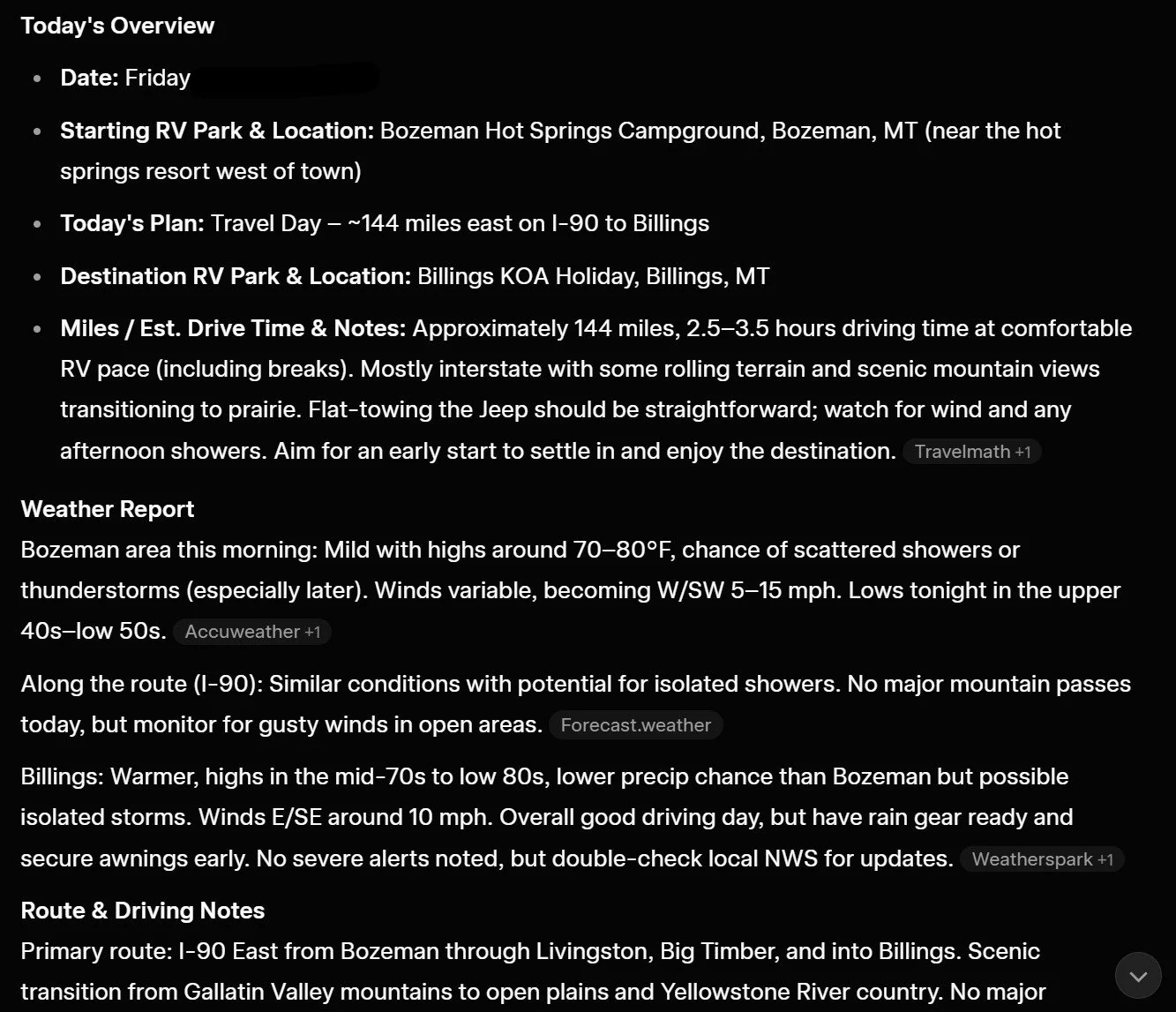
The newest feature, tasks, can be used to automatically run a prompt each morning. I created a Daily RV Trip Digest which runs at 6:00am every morning. It generates a weather report for our day, lists out truck stops along the route that are a good fit for our RV, highlights any sites along the way (based on our preference for historical sites or americana), etc. Amazing.
Step by Step Instructions for Creating a Grok Task
Create a New Task: In Grok, navigate to the Tasks section and click “New Task.” Give it a descriptive name like “Daily RV Trip Digest – America 250.”
Set the Schedule: Choose a daily trigger time that works for your travel schedule (I use 6:00 AM so it’s ready when we wake up).
Write (or Let Grok Write) the Prompt: Tell Grok what you want, then ask it to craft the perfect prompt. Example request: “Create a daily task that gives me a morning digest including weather along today’s route, recommended truck stops for our Dutchstar, historical sites or Americana attractions near our path, and any important travel tips.”
Upload or Reference Project Files: Make sure the Task has access to your “America 250 RV Trip” Project so it knows your exact route, dates, RV length, and preferences.
Customize the Output: Instruct Grok to format the digest nicely (bullet points, emojis, mileage breakdowns, etc.). You can refine it by saying “Make it shorter” or “Add fuel price estimates” after testing the first few days.
Activate & Test: Turn the Task on. Grok will automatically run it every morning and send you the personalized report. Test it with “Run the Daily RV Trip Digest now” to see the output.
Pro Tip: Start simple. Let Grok write the initial Task prompt for you — then tweak it over a few days until it delivers exactly what you need while driving your Class A diesel pusher.
Screenshot of my Grok Daily Digest Email
Major Tip for Using Grok (or any AI)
Many people miss the easiest thing you can do with AI, which is to ask it how best to use it. You don’t have to actually know how to do anything I’ve mentioned so far, you can just ask Grok “how can I use Grok to answer questions about my RV” and it will tell you how to add information to its memory or how to create a Project.
When you are creating something like a task, I don’t start with writing the task prompt. I just tell it what I want, and ask Grok to write the Task prompt for me. It will reply with a perfectly written prompt that you can just paste in.
In other words, you don’t need to know “how” to do anything with AI. Just tell it what you want to accomplish and ask how to do that. This is exactly how I learned to do all this. This is the best tip I give people when talking about using AI.
Real-World Examples of Grok as an RV Co-Pilot
Ok, let’s do the deep dive now.
Here’s what I have setup:
Main information I want Grok to remember about me, my RV, and how we use it is committed to my “Personal Memory File”
Trip specific information (route, dates, parks) is stored as a Project
Tasks setup to create a daily digest
Uploading Information to your Personal Memory File
For the basic information about my RV that I knew while sitting at my computer, I just put that into the chat and told Grok to “add this info to my personal memory file”. This was the basic info like my year, make, model, etc.
But I also took it a step further. I took pictures of the control panel above the drivers seat that includes the solar monitor panel, the main electrical monitor screen, etc. Then I just uploaded the pics and told Grok to add those to the personal memory in the RV section. Grok identified each piece of equipment we have (the specific solar setup, electrical control system, etc.) and added those.
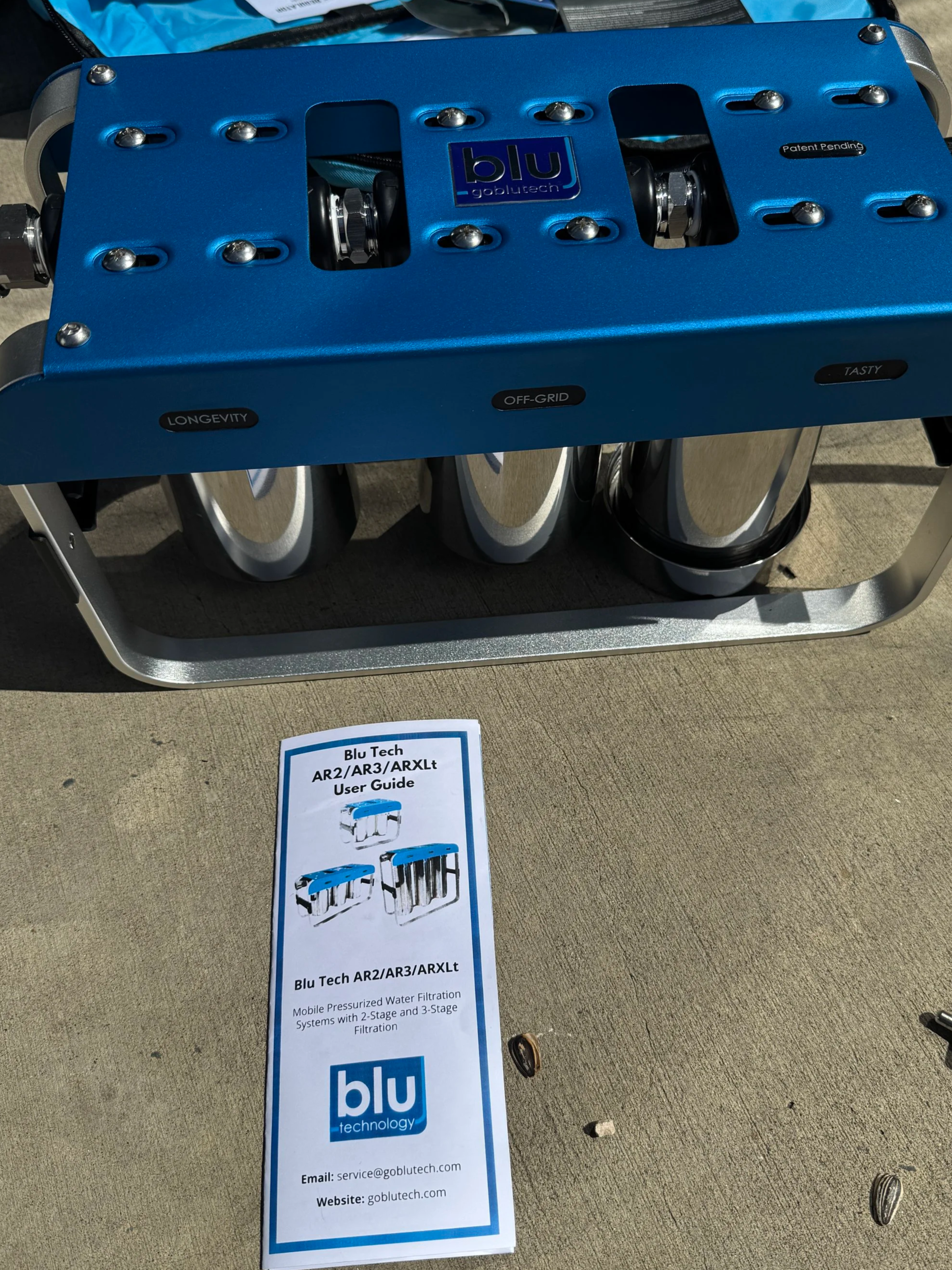
Picture Upload to Grok for Equipment
Rather than find the model number for our water filter, I just placed the manual on the ground, and took a picture of it. Uploaded the pic to Grok, and added it to our memory profile.
I also took pics underneath the coach of things like the Oasis, generator, and the water bay - and it identified that exact model. Once again “add this to my personal profile in the RV section”
Then I told Grok all the additional equipment and setup I have, examples:
“Grok, we use Starlink Gen 3 for internet in the RV. I mounted the router on a wall in the rear passenger side cargo bay next to an outlet where it’s plugged in. I route the cable through the door seal to the outside, and just use the dish on the ground where I have good line of sight to the sky. Add this to my personal memory file”
“Grok, I use two ReoLink Atlas security cameras to monitor the RV while away. I use these with the ReoLink HomeHub, which is in a cabinet inside the coach. Add this to my personal memory file.”
“We have a Blu Tech 3-stage water filter that sits in the water bay to filter water before it enters the coach. Here’s a link to the Blu website of the exact model we have [link pasted in]. Add this to my personal memory file.”
And so on with everything I could think of. If I wasn’t sure which model I had, I took a picture and uploaded that or found the Amazon link where I bought it and uploaded the link.
Uploading Information to the Grok Project for our Trip
I plan out our route and stops in RV Life Trip Wizard, which has a great export function. But I didn’t know that.
So I just asked Grok “I plan my trip in RV Trip Wizard, can you access that info to help me find fun stops along our trip?”
Grok answered “No, I cannot directly access information with the RV Life Trip Wizard because it is within your account. But you can export the trip as a file, which I can read. Here are the instructions to log into RV Trip Wizard and export your trip details…Once exported, upload the file here and I will add it to your America 250 RV Trip Project”.
So I followed those instructions - success.
Now I can ask Grok something like “Is there a Love’s truck stop along our route tomorrow?” and Grok will tell me the location and how many miles into the route that day.
Grok Voice Mode
I can also now ask Grok questions about the route, weather updates, or suggestions on where to eat at our next stop…while I’m driving. Just put Grok in voice mode, and have a convo.
Summary
Grok has become an RV Expert Co-Pilot during our trips.
I don’t look through our Dutchstar manual, or RV forums, or search YouTube videos for answers. I let Grok do that for me and get answers tailored to our specific RV or our specific trip.
Ok, that’s all for now. Shoot us a note if you have questions or tell us how you’re using your favorite AI app to be your co-pilot.
We hope you enjoy seeing America By RV as much as we do!
Frequently Asked Questions
-
Basic chatting with Grok is free, but the powerful features I use (persistent Memory for your RV details, Projects for trip itineraries, and automated Tasks for daily digests) require a paid plan — either X Premium+ or the standalone SuperGrok subscription. I find it well worth it for serious RV travel use.
-
Not only will this work for any RV, this works for just about anything in your life. I use all these same Grok tools around my house, my farm, etc. If there is information about something online, Grok can use it to provide
-
You should not upload any personal identifying information, logins, or other confidential data.